Quantcast
Channel: Mobile Point
Viewing all 201 articles
Browse latest View live

VolcaoBox 2.1.8 update release

$
0
0
VolcanoTool_v2.1.8.rar release with SPD Android Verification system, SPD android verify safe format, SPD android verify safe root, SPD android verify safe read info, MTK 6260 flash ic phone's support Flash Read, Write, Imei repair and more improvement with this update.

What's new?
in VolcanoTool_v2.1.8.rar
  • World's 1st Added SPD Android Verification system
  • World's 1st Added SPD Android Verify your phone is Safe for format
  • World's 1st Added SPD Android Verify your phone is Safe for Root
  • World's 1st Added SPD Android Verify your phone is Safe for READ INFO
  • Added MTK 6260 Read Flash
  • Added MTK 6260 Write Flash
  • Added MTK 6260 Imei Repair
  • Added MTK 6260 Read privacy code
  • Adjust MTK Android One-key Root(Solve some phones failed to root)
  • Adjust coolsand Read flash bug
Download link 1: VolcanoTool_v2.1.8.rar 
Download link 2: VolcanoTool_v2.1.8.rar

Z3X Samsung Tool 14.7 and 14.8 Update

$
0
0
Samsung Tool 14.7 and 14.8 Update. Massive Update. ZRoot impoving. New phones added. First in the world

V14.7 New phones added to ZRoot: GT-S5300,GT-S5301,GT-S5302,GT-S5303,GT-S6802,
GT-S5360,GT-B5510,GT-B5512,GT-S5570,GT-B5512,GT-B5512B,GT-S6102,GT-S6102(B,E,Z)
Soon may be we will add button for this. but now root is automatic before any job with phone.

V14.8 New phones added to ZRoot: S5310,S5312,S5303,S5301,S6010,S6012,B5330
Soon may be we will add button for this. but now root is automatic before any job with phone.

Added:
- Samsung GT-S6800 support (direct read codes,unlock, flash) - first in the world (from 4.06.2013)
- Samsung GT-S6010L support (direct read codes, unlock, imei repair, flashing,autoroot)
- Samsung GT-B5301B support(direct read codes, unlock, imei repair, flashing,autoroot)
- Samsung GT-S6810B support (direct read codes, unlock, imei repair, flashing,autoroot)
- Samsung GT-S6810L support (direct read codes, unlock, imei repair, flashing,autoroot)
- Samsung GT-S6810M support (direct read codes, unlock, imei repair, flashing,autoroot)
- Samsung GT-S5312 support (direct read codes, unlock, imei repair, flashing,autoroot) - first in the world
- Samsung GT-S5310 support(direct read codes, unlock, imei repair, flashing,autoroot) - first in the world
- Samsung GT-S5312L support (direct read codes, unlock, imei repair, flashing,autoroot) - first in the world
- Samsung GT-i8730 addition direct imei repair 1click*. - First in the world
- Samsung GT-P3100 addition support (one click network repair, imei repair ) - need root manualy
- Samsung GT-S6312 addition support ( Network repair real solution )
- Samsung GT-S6310 addition support ( Network repair real solution )

* Some i8730 phones with 4.2.1 android not have option ( *#7284# > qualcomm > DM+MODEM+ADB)
for phone like this you can use 4.0.4 firmware. this will fix your problem.

Download

Samsung Tool 14.9 update release download

$
0
0
Today we present next step of OneClick imei repair and Network repair exclusive soltuion, some of them like usual exclusive and first in the words.
New phones added to ZRoot: GT-i8552, GT-I8550, GT-I8550L
Added:
- Samsung GT-N7100 addition support (Onelick imei repair solution(10 second), Network repair solution,)- first in the world
- Samsung GT-P5100 addition support (Imei repair via USB cable only*, Network repair* )without patched firmware - first in the world
- Samsung SC-04E added (read codes, direct unlock)
- Samsung GT-i8552 support (direct read codes, unlock, imei repair, flashing,autoroot, network repair) - first in the world
- Samsung GT-i8550L support(direct read codes, unlock, imei repair, flashing,autoroot, netwok repair) - first in the world
- Samsung GT-i8550 support (direct read codes, unlock, imei repair, flashing,autoroot, network repair) - first in the world
- Samsung GT-N8020 addition support (imei repair, network repair)
Changed unlock algo for S6810, S6810L, S6810P
Download

Micro USB cable D+ D- technical review

$
0
0
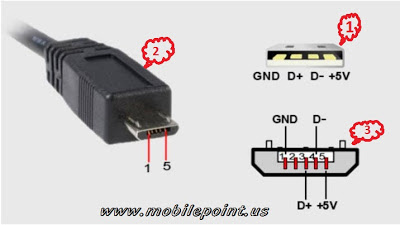
Micro usb cable are most popular devices for USB data connectivity connector. That's for we show you Micro usb data cable technical review and it will help you for finding easily D+ D-(Data +, Data -) Vbat & GND connection in micro usb cable.
How to connect a mobile in USB mode or Flash box  mode?
  1. This four pin wire cable opposite side of micro usb connector.
  2. This micro usb side(Micro usb connector)
  3. This main layout view of micro usb connector it will identify you which pin D+ D- and which Vbat, GND between 5 wire.

Volcano box V2.1.9 update release

$
0
0
Volcano Box 2.1.9
Volcano box release there experienced module software tool VolcanoTool_v2.1.9.rar, This update is very impotent for all volcano box user.

Whats new?
  • Adjust SPD Android Read infor
  • Added SPD Android new flash ic
  • Added MTK Android Auto Format (nand+emmc)
  • Adjust SPD Android Root
  • Added LOT of new SPD Android Phones for SAVE Format & Root etc, you must verify for save format
Download
Mirror 2: HotFile Link

Sony Ericson / Xperia fast boot button indicate and fastboot utilities

$
0
0
The following list shows the Fastboot button for each of the supported phones. Hold the Fastboot button while connecting your phone to a computer with a USB-cable. See the Instructions page for more information.
Fastboot buttons
  • Sony Ericsson Xperia™ PLAY: Search button
  • Sony Ericsson Xperia™ arc: Menu button
  • Sony Ericsson Xperia™ arc S: Menu button
  • Sony Ericsson Xperia™ neo: Menu button
  • Sony Ericsson Xperia™ neo V: Menu button
  • Sony Ericsson Xperia™ pro: Menu button
  • Sony Ericsson Xperia™ mini: Volume up button
  • Sony Ericsson Xperia™ mini pro: Volume up button
  • Sony Ericsson Xperia™ ray: Volume up button
  • Sony Ericsson Xperia™ active: Volume up button
  • Sony Ericsson Live with Walkman™
  • Sony Xperia™ S: Volume up button
  • Sony Xperia™ P: Volume up button
  • Sony Xperia™ go: Volume up button
  • Sony Xperia™ U: Volume up button
  • Sony Xperia™ sola: Volume up button
  • Sony Xperia™ acro S: Volume up button
  • Sony Xperia™ ion: Volume up button
  • Sony Xperia™ miro: Volume up button
  • Sony Xperia™ tipo: Volume up button
  • Sony Xperia™ tipo dual: Volume up button
  • Sony Xperia™ V: Volume up button
  • Sony Xperia™ J: Volume up button
  • Sony Xperia™ T: Volume up button
  • Sony Xperia™ TX: Volume up button
  • Sony Xperia™ E: Volume up
  • Sony Xperia™ E dual: Volume up
  • Sony Xperia™ ZL: Volume up
  • Sony Xperia™ Z: Volume up
  • Sony Xperia™ L: Volume up
  • Sony Xperia™ SP: Volume up
Fastboot driver: downloadinf.zip

Samsung I9300 dead boot recover solution

$
0
0
Samsung galaxy S3 / I9300 dead boot repair procedure via Unbrick cloned SD Card. How to recover dead boot for Samsung S3 / I9300.
Procedures:
The things you will need:
First , to make
GT-I9300 Unbrick SD Card cloned
* download this tiny i9300.7z file.. (883kb).
* extract using 7zip...

* use HDDRAW Copy to burn i9300.img (3.72GB) to a 4gb SD card.
For me;i used 4GB SD card completely cleaned
After successful burn sd card clone ;
Disassemble the S3 I9300 Dead
undefined
Insert SD card cloned to PBA
undefined

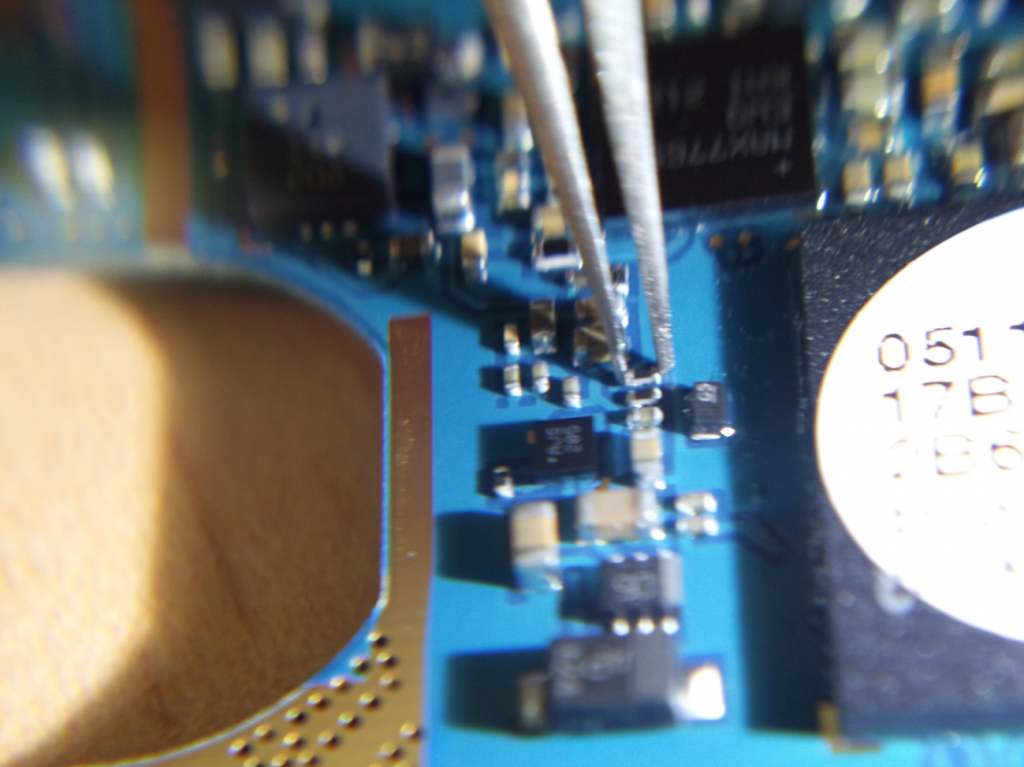
Connect the PBA with rj45 c3300K (C3303K UART Auto Ignition! it's use to repair I9300 imei) and connect rj45 to the box (for me i connected to riff box rj45)
insert battery

Short R313 resistance.(HQ uses tweezers to short the resistance)
undefined

Turn on the PBA, and REMOVE THE SHORT between 3 to 6 seconds from turning on the PBA.
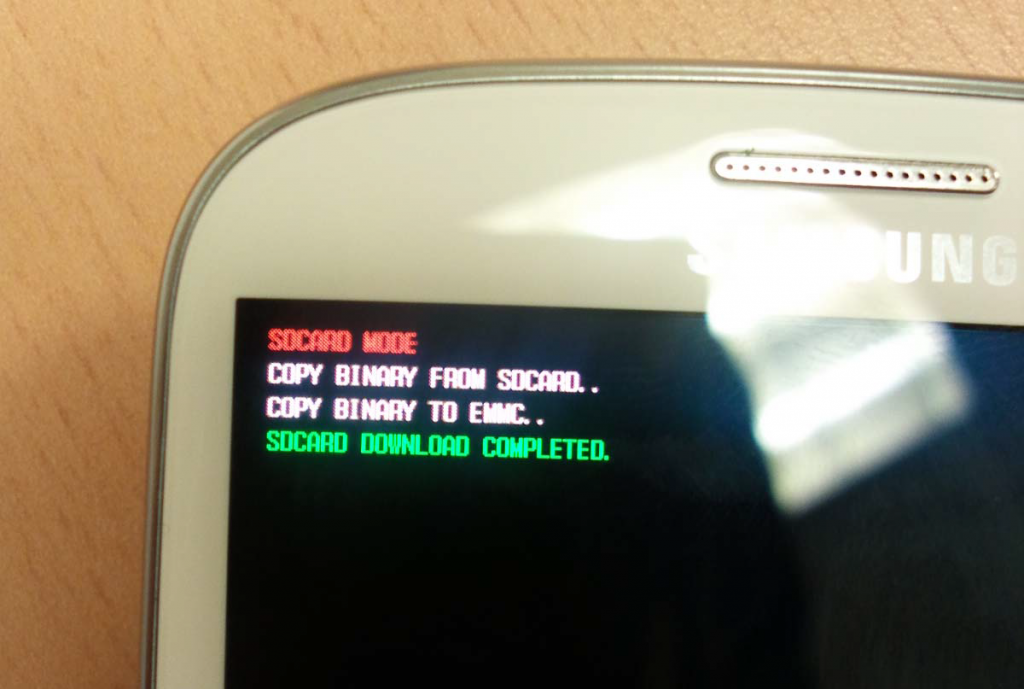
After approximately 5 seconds, you can see message on the LCD boot recovery was succeeded
undefined
Turn off the pba, and remove SD Card.
Assemble the phone, and enter download mode.Download Full S/W including PIT, PDA, CSC and PHONE with ODIN.
 Created by sakoou

Miracle Box update v1.52

$
0
0
Miracle box download update V1.52 release earlier  today. Here include Miracle box firmware update V1.10 with this Miracle_box_v1.52_Miracle-Team.exe.So miracle box user don't mis it.
What's new?
  • Support for reading SC6531(SPD)
  • Upgrade to new firmware 1.10
  • Russian language added
  • Some bugs remove
Download
File name: Miracle_box_v1.52_Miracle-Team.exe
Size: 51.92MB

Samsung Tool 15.1 Update released

$
0
0
Z3x box again big boom update by SamsungTool_15.1.exe.
All time we try to improve our solutions and we offer first in the word update.
Lets start from list of new added phones:

Added:
- support GT-i9305T (direct unlock, imei repar, flashing)
- support GT-S5280 (direct unlock, read codes, imei repair flashing) - first in the world
- support GT-S5282 (direct unlock, read codes, imei repair flashing) - first in the world
- support GT-S5300L (direct unlock, read codes, imei repair flashing)
- support GT-S6310D (direct unlock, read codes, imei repair flashing)
- support GT-S6310L (direct unlock, read codes, imei repair flashing)
- support GT-S6310T (direct unlock, read codes, imei repair flashing)
- support GT-S6313 (direct unlock, read codes, imei repair flashing) - first in the world
- support GT-S6313T (direct unlock, read codes, imei repair flashing) - first in the world

Second part of update, now for most GS3 LTE and SG4 LTE you even no need root for imei repair.
Network settings will no be changed while imei repair like other solution.
This solution work for phone with not damaged or erased EFS.

addition support SGH-I717 (direct imei repair 2sec, without root) - First in the world
addition support SGH-I717D (direct imei repair 2sec, without root) - First in the world
addition support SGH-I717M (direct imei repair 2sec, without root) - First in the world
addition support SGH-I717R (direct imei repair 2sec, without root) - First in the world
addition support SGH-I727 (direct imei repair 2sec, without root) - First in the world
addition support SGH-I727R (direct imei repair 2sec, without root) - First in the world
addition support SGH-I747 (direct imei repair 2sec, without root) - First in the world
addition support SGH-I747M (direct imei repair 2sec, without root) - First in the world
addition support SGH-I747U (direct imei repair 2sec, without root) - First in the world
addition support SGH-I757 (direct imei repair 2sec, without root) - First in the world
addition support GT-I9305 (direct imei repair 2sec, without root) - First in the world
addition support GT-I9505 (direct imei repair 2sec, without root) - First in the world
addition support GT-I9508 (direct imei repair 2sec, without root) - First in the world
addition support SGH-I957 (direct imei repair 2sec, without root) - First in the world
addition support SGH-I957D (direct imei repair 2sec, without root) - First in the world
addition support SGH-I957M (direct imei repair 2sec, without root) - First in the world
addition support SGH-I957R (direct imei repair 2sec, without root) - First in the world
addition support SGH-M919 (direct imei repair 2sec, without root) - First in the world
addition support GT-N7005 (direct imei repair 2sec, without root) - First in the world
addition support GT-N7105 (direct imei repair 2sec, without root) - First in the world
addition support GT-N8020 (direct imei repair 2sec, without root) - First in the world
addition support SGH-SC02E (direct imei repair 2sec, without root) - First in the world
addition support SGH-SC03E (direct imei repair 2sec, without root) - First in the world
addition support SGH-SC05D (direct imei repair 2sec, without root) - First in the world
addition support SGH-T769 (direct imei repair 2sec, without root) - First in the world
addition support SGH-T879 (direct imei repair 2sec, without root) - First in the world
addition support SGH-T889 (direct imei repair 2sec, without root) - First in the world
addition support SGH-T889V (direct imei repair 2sec, without root) - First in the world
addition support SGH-T989 (direct imei repair 2sec, without root) - First in the world
addition support SGH-T989D (direct imei repair 2sec, without root) - First in the world
addition support SGH-T999 (direct imei repair 2sec, without root) - First in the world
addition support SGH-T999V (direct imei repair 2sec, without root) - First in the world
addition support SGH-I317(direct imei repair 2sec, without root) - First in the world
addition support SGH-I317M (direct imei repair 2sec, without root) - First in the world
addition support SGH-I337 (direct imei repair 2sec, without root) - First in the world
addition support SGH-I337M (direct imei repair 2sec, without root) - First in the world
addition support SGH-I437 (direct imei repair 2sec, without root) - First in the world
addition support SGH-I577 (direct imei repair 2sec, without root) - First in the world

Notes: Please read carefull manual for imei repair for each phone!!!
For phones with erased SN or erased EFS you need ROOT and use old method of repair.
Be carefull: NEW security July 2013 GS3 and GS4 phones not work with this solution and not exist any solution for that phones. Just downgrade.
Download

Infinity Nokia Best tool update V1.66 released

$
0
0
Infinity best Nokia  best tool update InfinityBox_install_BEST_v1.66.rar released and available for download
Link: infinityBox_install_BEST_v1.66.rar
Infinity-Box Nokia [BEST] v1.66 released

- USB flashing improved
XG618 flashing support released (Dead/Normal)
XG223 flashing improved (Asha OS)
XG213 flashing improved
AfterFlash operations improved

- Service operations improved
XG618 support released - all service operations, including LT edit, Counter reset, FS format and, PM/PP operations and e.t.c.
WP8x RPL operations improved
WP8x NV operations improved
XG213 RPL operations improved: Asha 210 and same supported
XG618 Flash Reading released
XG618 RPL operations released: Read/Write full RPL (NPC/CCC/HWC/SimLock/CMLA/DRM)

- User Data operations improved

- XG618 support released
XG618 : PhoneBook read/write/extraction
XG618 : Gallery extraction
XG618 : Calendar/Notes read/write/extraction
XG618 : SMS/MMS read/write/extraction
XG618 : MMC password read/write/extraction
XG618 : Added support for S4pb PhoneBook cross-writing

- XG618 User Data extraction released (PhoneBook, Gallery, SMS/MMS, Calendar/Notes)

- Added XG618 Forensic
PhoneBook extraction from totally damaged memory
Extraction of deleted PhoneBook records

- S60 Symbian 9.x PhoneBook extraction from dump improved (Normal mode)

- Improved S60/UIQ Forensic
Improved support of big phonebook entries (was errors on dumps with more than 3000-5000 records)
Added support for Nokia APE dumps (with spare or clear dumps)
Added support of memory dumps from some SE and Samsung, based on Symbian UIQ
Allow extract phonebook from Nokia APE based and other UIQ phone dumps (need read dump from flash memory with external prog)

- Improved S40 Forensic
Added some XG213 and BB5 new firmware types
Improved accuracy

- S40 PhoneBook engine re-written. Support all existing S40 generations (Direct mode)

- Improved S40 Gallery extraction from flash

- Initial support of Asha OS platform added

- Other:
Released XG213, XG618, XG110 language info extraction during file selection (as for BB5 S40)
Improved XG223 language extraction
Flash File checking improved for BB5/XG products
Ini Updated and revised
Fixed some other problems

- New module released: - Series 40 Content Tool (xCntTool)
Tool usage: Making custom image files with preloaded content, provider settings, own content, clean images and etc.
- Allow Extract/Repack images for all XG213 phones
- Allow Extract/Repack images for all XG618 phones
- Allow Extract/Repack images for all xsr BB5 phones
- Allow Extract images for XG223 normal phones
- Allow Extract images for Asha OS phones
Extracted image - simple ISO file, can be edited with WinImage, UltraIso and etc.
Image can be packed back to flash file after editing and then can be flashed back to phone.

Z3X Samsung Tool 15.2 update released

$
0
0
We hope z3x users will be happy if we will give update daily or at least few times in week.
Lets start from today.
What's new?
- full support GT-E1200L (direct code reading/unlock/imei repair/flashing) - first in the world
- full support GT-E1202L (direct code reading/unlock/m&s imei repair/flashing) - first in the world
- full support GT-E1272 (direct code reading/unlock/m&s imei repair/flashing) - first in the world
- full support GT-P6200L (flash, direct unlock/imei repair)
Download

Android ToolKit TnDroid light released

$
0
0
TnDroid Light developed by ip4tnsn0w make you easy ways to repair, The most popular Android oS reset, unlock recover boot.
Specific service

Reboot:
Reboot in recovery mode,
Reboot in boot loader,
Reboot in download mode,
Direct reboot,

Unlock:
Reset user lock,
Reset Gesture lock,
Reset Gmail/patter lock,
Reset face lock,

Wipe:
All data will be permanently erase with no chance to recover,

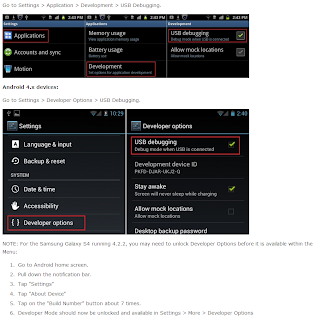
Note: Must need USB debugging enabled.
How to Android USB debugging enable.png

Download
File name: TnDroidLight.rar
Size: 1.12MB

iOS 7 Beta 4 released with ipsw direct link

$
0
0
The Apple iPhone, iPad, iPod iOS 7 Beta 4 released, with many amazing futures. iOS 7 Specially home main theme change, bug fix, and more exiting improvement.

Download
iPhone's:
- iPhone5,1_7.0_11A4435d_Restore.ipsw - iPhone 5 A1428 US And CA GSM iOS 7 Beta 4
- iPhone5,2_7.0_11A4435d_Restore.ipsw - iPhone 5 A1429 US CDMA And Rest Of World GSM iOS 7 Beta 4
- iPhone4,1_7.0_11A4435d_Restore.ipsw - iPhone 4S iOS 7 Beta 4
- iPhone3,1_7.0_11A4435d_Restore.ipsw - iPhone 4 GSM iOS 7 Beta 4
- iPhone3,2_7.0_11A4435d_Restore.ipsw - iPhone 4 Rev A iOS 7 Beta 4
- iPhone3,3_7.0_11A4435d_Restore.ipsw - iPhone 4 CDMA iOS 7 Beta 4

iPod's:
- iPod5,1_7.0_11A4435d_Restore.ipsw - iPod Touch 5th Gen iOS 7 Beta 4

iPad's:
- iPad2,1_7.0_11A4435d_Restore.ipsw - iPad 2 WiFi iOS 7 Beta 4
- iPad2,2_7.0_11A4435d_Restore.ipsw - iPad 2 WiFi + GSM iOS 7 Beta 4
- iPad2,3_7.0_11A4435d_Restore.ipsw - iPad 2 WiFi + CDMA iOS 7 Beta 4
- iPad2,4_7.0_11A4435d_Restore.ipsw - iPad 2 Rev A iOS 7 Beta 4
- iPad2,5_7.0_11A4435d_Restore.ipsw - iPad Mini A1432 WiFi iOS 7 Beta 4
- iPad2,6_7.0_11A4435d_Restore.ipsw - iPad Mini A1454 US & CA GSM iOS 7 Beta 4
- iPad2,7_7.0_11A4435d_Restore.ipsw - iPad Mini A1455 US CDMA And Rest Of World GSM iOS 7 Beta 4
- iPad3,1_7.0_11A4435d_Restore.ipsw - iPad 3 WiFi iOS 7 Beta 4
- iPad3,2_7.0_11A4435d_Restore.ipsw - iPad 3rd Gen WiFi + CDMA iOS 7 Beta 4
- iPad3,3_7.0_11A4435d_Restore.ipsw - iPad 3rd Gen WiFi + GSM iOS 7 Beta 4
- iPad3,4_7.0_11A4435d_Restore.ipsw - iPad 4th Gen A1458 WiFi iOS 7 Beta 4
- iPad3,5_7.0_11A4435d_Restore.ipsw - iPad 4th Gen A1459 US & CA GSM iOS 7 Beta 4
- iPad3,6_7.0_11A4435d_Restore.ipsw - iPad 4th Gen A1460 US CDMA And Rest Of World GSM iOS 7 Beta 4

Volcano box 2.2.1 released

$
0
0
Volcano box 2.2.1 update released with more improvement in main china mobile repair module.
What's new?
  • Added SPD 6820/8810 Android Read Flash
  • 1st Read info then write Flash !!
  • Added SPD 6820/8810 Android Write Flash (**BETA Don't write on Working phones can harm your phone)
  • Added SPD 6531 Read Flash
  • Added SPD 6531 Write Flash
  • Added SPD 6531 Find Password
  • Added SPD 6531 Format (for safety recommendations please backup data first, then load file to format)
  • SPD 6820/8810 new flash ic added
  • MTK Andriod Write added new algorithm
  • Adjust MTK Andriod change IMEI new algorithm,solve some imei lost after reset factory
  • Adjust SPD Andriod ADB Read partition
  • Adjust SPD Andriod Root and Format
  • Added 625a imei repair meta mode ( software can show nothing but infact imei repaired in phone )
  • Added Round 102 new Firmware for Root
  • Added Round 123 new Frimware for format
  • Always Readinfo 1st then do Format
  • Always do MTK Android AUTO format
  • Do not Customize MTK Android phones
  • No need to register
  • Firmware update
  • Must Connected to internet before you run it 1st time !!
Download

SuperSU update v1.51

$
0
0
Android phone utility SuperSU update version released.
Tag: SuperSU, UPDATE-SuperSU-v1.51.zip, root file jellybean update utilities, android Super User, Update SuperSW V1.51.zip.
What's new and changes?
in UPDATE-SuperSU-v1.51.zip
 SuperSU v1.50 released - important dev details

Another day another update - and unless some major issues arise, quite likely the last one until September.
The latest flashable ZIP is linked at the very bottom of the post. The Play store has also been updated, as have all CF-Auto-Root's.
I recommend all end-users on 4.3 update immediately, as root-app-devs will be unlikely to want to support quirks of the previous releases.
PS the ZIP should now also be compatible with the new CM

ARMv5 compatibility dropped

Due to some incompatibilities in the new code for 4.3, and not wanting to create a maintenance nightmare for myself, I have dropped support for ARMv5. The last ARMv5 (and v6) compatible version is v1.45.

It has been quite some time since the last flagship device came out running an older version than ARMv7, the small number of SuperSU users who are still using it will be unlikely to benefit (much) from further updates to SuperSU anyway.

Sorry if this creates problems for you. I may revisit ARMv5 support when a proper 4.3 AOSP build tree is available for it.

Proper storage mounts

All the storage locations ( /storage/emulated/0, obb, legacy, etc) are now properly available from su. These should be the exact same storage mounts as available to the non-privileged portion of your app, and they are now mounted instead of symlinked. This should solve most (internal) storage-related issues with most apps.

Proper mount namespaces

Mount namespaces were brought to Android in 4.2, and are a good thing (just like all the new restrictions in 4.3 really are a good thing, even if it's causing us some root grief at the moment).

With the previous 4.3 SuperSU versions all root commands were executed in the same (global!) mount namespace (as if this was still 4.1). This is bad for multiple reasons. One reason is that if one su process remounted /system read-write, other processes could sneakily be writing to /system, opening a possible malware hole. Another reason is unintended interference. If you have two root apps who want to update something in /system, one could just be done (remounting the system back read-only) while the other one was still updating. The latter app will probably break in new and unexpected ways.

In this release, su calls from Android apps under 4.3 have same mount privacy as they would have had under 4.2. As it should be!

(Note that su calls from non-Android apps, like adb shell, share a single mount namespace)

Processes

If you're going to watch the number of processes running on your device, you will see several daemonsu processes. There is the master daemon, with a subprocess for every different Android app user id that uses su - and a separate one for non-Android callers -, which in turn has a subprocess for every su session (which automatically terminates). You might also see a zombie process sometimes, these are automatically cleaned up.

The exact how and why is long and technical, but it's needed, and these processes do not eat any resources while su isn't being used (they're just sleeping). On the plus side, when debugging you can easily see which su calling process is hogging all your resources, as the process name reflects this information, which will be visible in ps and top.
Fixing internal storage issues

If this is not your first SuperSU version on 4.3, some files on your internal storage may have the wrong permissions, which will prevent you or your apps from deleting/modifying some files.

This can be fixed pretty easily, but you need to install busybox first, as toolbox's builtin chown command does not recursive directories. Once busybox is installed, this will fix the problem (run from terminal, adb shell, etc, as long as you have a su# prompt):

busybox chown -R 1023.1023 /data/media/*

Changelog
- Daemon: proper storage mounts
- Daemon: per-uid mount namespace
- Daemon: another exitcode issue fix
- Daemon: adjusted reload code
- Daemon: descriptive process names
- GUI: added reboot advisory after binary update
- ARCH: Only ARMv7 and X86 are now supported, ARMv5 dropped
- ZIP: install also to install-recovery.sh and init.d
Download
UPDATE-SuperSU-v1.51.zip

Sucre: Google pulse user Chainfire

Volcano box V2.2.2

$
0
0
Volcano box Update V2.2.2 released! here added MTK one key ADB mode ROOT and more.
What's new?
in VolcanoTool_v2.2.2.rar
  • Added MTK one key ADB mode ROOT
  • Added One key ADB mode Root for many other Cpu ( BETA )
  • Solution for CFC
  • Added One key to solve CFC don't calibrate
  • Added One key for SPD Android to Solve Don't Calibrate
  • Added new flash Support for Spd Android phones
Download 

Volcano box 2.2.3

$
0
0
Volcano box 2.2.3 update released! This version specially for almost all android phones. Now volcano box can repair android gmail account reset without any data lost, and more exiting improvement.

What's new?
in Volcano box update 2.2.3
MTK Android BOOT Increased to WIPE data and cache
Supported for ROOTED Android Phone

MTK Android Increased a Reset GMAIL Account
Support ROOTED Android Phones & Usb Debug Mode ON
**Without DATA LOSTED
**Supported All Most All Kind of Android Phones
**Such has Original Samsung - HTC Etc
MTK & SPD Phoones are TESTED

MTK Android adjustment su/unlock
Supported Which Phones are ADB ROOT

Adjust MTK Android Write Flash
Optimization of SPD Android format
 
Download
File name: VolcanoTool_v2.2.3.rar 
Size: 119.2MB

UFSx + HWK box update released

$
0
0
UFSx + HWK update released. Main update  with particular tool update Nokia tool- DCTxBB5 v2.3.0.0, LG tool- LG_GSM v2.3.0.0, Samsung tool- SAMs v2.2.0.3.
Tags: 
What's new?

DCTxBB5 v2.3.0.0
-----------------
1. BB5 RAPU Based Products USB Flashing / UI support added:
RM-754 (801T)
2. DCT4 INFINEON Based Products USB Flashing / UI support added:
RM-694,RM-761,RM-799,RM-800 (X2-02,200,201,201.1)

LG_GSM v2.3.0.0
-----------------
1. Infineon Egold Boot Fixed (was broken in v 2.2.0.3)
2. Infineon E500,KM553,KM555,KM555e,KM555g,KM555R added (FL,CUL)
3. Infineon GT370,GU230GO,S367 added (FL,CUL,DUL,IM)
4. Infineon T370,T375,T385,T385b,T395,T500GO,T505GO,T565,
T565b,T575 added (FL,DUL)
5. MTK: A290 added (FL,3xIM)
6. MTK: USB Support for UI Functions (Select COM on Phone)
7. WiFi MAC Address Write Added for Infineon and MTK platforms.

SAMs v2.2.0.3
--------------
SWIFT
T456-FIDO,T456-ROGERS added (UNL,SECT,IM,FL)
SWIFT-AEROFONE
[Patch MSL] fixed for DUOS Products.
E1086W,E1153i,E1182-CHN,E1195L,E1200,E1200M,E1200M-CHN,
E1200T,E1202,E1205,E1205L,E1205M-CHN,E1205T,E1207,E1207T-IND,
E1207-MEA,E1220T,E1230T,E1232B,E1232D added (PUNL,PIM,FL)
C3520,C3780,C3782,E2250,E2252 added (UNL,SECT,IM,FL)
E2220,E2222L (UNL,SECT,IM)
SWIFT-3G
C3630,C5190,C5530,E3217B,E3217L,S5270K,S5270L,S568 0
added (UNL,SECT,FL)
C5010,E3210,E3213,S5610 Direct Unlock Fixed.
IMEI Repair Added for Almost All Models:
C3630,E2310,E2313,S3710,S5270,S5610,..
INFINEON
C3310,C3310R,C3312,C3312R,C3313K,C3330,C3332,C3350 ,C3350M,
E2230L,E2350B,E2600,E2600M,S3800,S3802,S3802W,S522 0,S5220R,
S5222,S5222R,S5229,S5292,S5296 added (CUNL,PUNL,PIM,FL,UFL)
E1151 Missing boot fixed.
E1151 IMEI Rebuild and Direct Unlock added (AT Mode)
Note: Need make Boot Mode Info before use of AT Mode.
QUALCOMM
M210S,T356 Added.
BROADCOM
S5380B,S5380D,S5380F,S5380G,S5780D,S7250,S7250D added (UFL)

Download
  1. UFSx_Support_Suite_Setup_v02.03.00.00 
  2. DHLT.part01.exe 
  3. DHLT.part02.rar
  4. DHLT.part03.rar
  5. DHLT.part04.rar
  6. DHLT.part05.rar
  7. DHLT.part06.rar
  8. DHLT.part07.rar
 

Volcano Tool update v2.2.4

$
0
0
Volcano main software update released version VolcanoTool_v2.2.4.rar with more software improvement adjust MTK android SP, and Samsung Phones for Read Code added and more.
What's new?
  • Adjust MTK Android Write Flash
  • Adjust ADB_ROOT
  • SPD Android added new flash ic
  • Added Samsung Phones for Read Code
  • Added Alcatal Phones to unlock etc
  • List of Samsung Support Phones for Read Code
A177, B130S, B130T, B138, B270i, BC01, C145, C160, C160B, C160L, C160M, C165, C166, C168, C168L, C270, C276, C276L, C280, C288
C3212, C3212i, C3222, C3222W, C3300, C3300i, C3300K, C3303, C3303K, C3310, C3310C, C3500, C3503, C3522, CC01, CC03, E1050
E1050V, E1055G, E1055T, E1070, E1070C, E1070M, E1070T, E1075, E1075L, E1080, E1080I, E1080F, E1080T, E1080W, E1081T, E1085
E1085F, E1085L, E1085T, E1086i, E1086L, E1086W, E1087T, E1088C, E1100, E1100C, E1100F, E1100H, E1100T, E1101C, E1105, E1105
E1105F, E1107, E1110, E1110c, E1112, E1117, E1120, E1120C, E1125, E1125W, E1130, E1130B, E1150, E1150i, E1150C, E115, E1160
E1170, E1170i, E1170T, E1172, E1175T, E1180, E1182, E1182L, E1186i, E1186W, E1190, E1195, E1200, E1200m, E1210, E1210M, E1210S
E1215, E1215F, E1230, E1230G, E1230T, E1232, E1232B, E1232L, E1252, E1310, E1310B, E1310C, E1360, E1360B, E1360C, E1360S, E1360M
E2100, E2100B, E2100L, E2120, E2121B, E2120L, E2121L, E2130, E2130B, E2152, E2210, E2210B, E2210C, E2210H, E2210L, E2210T, E2370
T101, T101G , T109, T119, T139, T155G, T219, T219S, T229, T239.A137, A226, A227, A237, A256, A257, A437, B2100, B2100C, B3410, B3410L, B3410R, B5702, B5702C, B5712, B5712C, B5722, C3510, C3518
C3610, C3610C, C5212, C5212I, C5212C, D600, D600e, D606, D608, D610, D618, D780, D788, D820, D825, D828, D900, D900E, D900i, D900P
D908, D908i, D980, D988, E1390, E200, E200B, E208, E208B, E230L, E236, E250, E250D, E250L, E250i ,E250V ,E250W, E251, E2510, E2510
E2510C, E2550, E2550D, E251C, E256, E258, E258d, E260, E340, E340e, E348, E350, E350E, E358, E370, E376, E378, E380, E388, E390
E398, E480, E488, E500, E508, E590, E598, E640, E648, E670, E690, E698, E730, E736, E740, E747, E748, E750, E758, E760, E768, E780
E786, E788, E830, E838, E890, E898, F110, F118, F150, F158, F250, F250L, F256, F258, F260, F265, F266, F268, F270, F270i, F270L
F275L, F278, F278i, F480L, F488E, G600, G600L, G608, G610, G618, G808E, I710, I718, I720, I728, I750, I858, J150, J158, J210, J218
J700, J700G, J700I, J700L, J700V, J706, J708, J708C, J708I, J770, J778, J808E, L250, L258, L310, L318, L600, L608, L708E, L750
L758, M1360, M150, M158, M200, M208, M2310, M2710, M2710C, M3200, M3310, M3310C, M3318, M3318C, M3510, M3510C, M3510L, M610, M618
P180, P200, P207, P220, P240, P250, P260, P780, P788, P850, P858, S3100, S3100C, S3110, S3600, S3600I, S3600C, S3600H, S3600I
S3600L, S3601, S366, S5050, S5050C, S5200, S5200C, S5220, S9402, T249, T249R, T329, T339, T349, T369, T369R, T379, T401, T409, T429
T439, T456, T459, T509, T619, T729, T739, T809, U708E, U800E, U808E, U900L, U908E, X670, X678, X690, X698, X700, X708.

  • List of Support Alcatal phones
F152

505K

AMSTERDAM

B331

C818

CRYSTAL

E101FLIP

F115

F121

F122

F123

F331

MISSIXTY2

OT103

OT104

OT105

OT106

OT107

OT108

OT109

OT112

OT113

OT117

OT132

OT140

OT150

OT2005

OT2010

OT2010

OT2010G

OT203

OT203A

OT203E

OT204

OT205

OT206

OT208

OT209

OT2117

OT213

OT214

OT214W

OT216

OT217

OT217D

OT222

OT223

OT228

OT228D

OT232

OT233

OT250

OT252

OT262

OT280

OT282

OT288

OT292

OT296

OT297

OT300

OT301

OT303

OT304

OT3040

OT3041

OT3042

OT305

OT306

OT308

OT310

OT311

OT312

OT315

OT315M

OT352

OT355

OT355D

OT356

OT360

OT361

OT362

OT363

OT380

OT383

OT385

OT385J

OT390

OT455

OT505

OT505K

OT506

OT506D

OT507

OT508

OT510

OT530

OT540

OT543

OT555

OT565

OT565K

OT585

OT600

OT602

OT606

OT608

OT650

OT655W

OT660

OT665

OT706

OT708

OT710

OT799

OT799

OT800

OT802

OT802Y

OT803

OT803D

OT806

OT806D

OT807

OT808

OT808G

OT809

OT810

OT810D

OT813

OT813D

OT813F

OT818

OT819

OT828

OT838

OT870

OT871

OT880

OT888

OT90

OT900

OT901

OT902

OT905

OT907

OTC819D

OTF101

OTT66

OTTEST

Q5

S by SFR 3440

S122

SFR115

SFR1150

SFR121

SFR122

SFR123

T268

TCL-I802

TCL-I806

TCL-I806D

TCL-I880

TCL-I898

TCL-I900

TCLI905

TCL-Q3

TCL-T208

TCL-T218

TCL-T255

TCL-T355

Text Ed 152 by SFR

T-Mobile Accord

Virgin VM202

Virgin VM665

VM621I

VM800
 Download
Cyclone box no TP - USB only rooting for lumia 800, 800C update released

$
0
0
Cyclone box present a great solution for USB rooting Lumia 800 and 800C, this method giving attractive and it is very easily can be root lumia listed models.
Cyclone installer : CycloneBoxInstaller.exe
Here official update notice and tricks,
- Added WORLD FIRST, USB ONLY, NO TP ROOTING FOR RM-801 LUMIA 800
- Added WORLD FIRST, USB ONLY, NO TP ROOTING FOR RM-802 LUMIA 800C

All NOKIA DLOAD OSBL loaders are supported (even latest one!)

Instructions:
1. Run Cyclone, it will be auto-updated
2. Update your Box Firmware to v2.20
3. Go to WP7 -> Simlocks Tab
4. Select Product and click ROOT!

It should go this way:

"Lumia No TP Root Procedure Started...

If phone is alive, It will be automatically swithced to OSBL mode.
If software can't switch to OSBL mode, or phone is generally DEAD do folllowing:

1. Turn OFF device, wait 15 seconds afterwards
2. Eject USB cable, wait 10 seconds
3. Press and hold Volume-UP button
4. Insert USB Cable. OSBL should be booted.

Booting CMT...
[Urządzenie kompozytowe USB]: WinUSB Port opened OK!
[Urządzenie kompozytowe USB]: WinUSB Port opened OK!
[Nokia USB Connectivity]: WinUSB Port opened OK!
Switching to RAW Mode...
[Nokia USB Connectivity]: WinUSB Port opened OK!
[Nokia USB Connectivity]: WinUSB Port opened OK!
OSBL Details
Protocol: v1.1
Version: v257.6
Build: 12
Timestamp: 2012-02-17 14:40:05
OSBL Bootloader Ready
USB&UART Tracing set
RSA Signature Calculated for QCB Boot, Writing...
OSBL Certificate Details
Magic: WP70
Version: 0
Signer Server ID: 0x98031573
Signer Timestamp: 2011-09-28 15:52:12
Signer S/N: 23
Signer User ID: 10046114
Auth Level: Care
Data Encryption: 0
Image Index: 0
Asic Index: 0
Type: Image Write
Hashtable Parsed OK
Certificate Accepted
[ASIC 0, Storage 4,1] Writing 850.552kB @ 0x000000000007D200
Write taken 0.358s (Average speed: 19462,61kBits/s)
Restoring Modem from BACKUP_RAMFS_IMAGE...
Restore OK
Restarting MCU...
Rooting Finished!"

After rooting, Qualcomm Bootloader is installed. That means phone will be detected as Mass Storage Device, and you will have full access to eMMC.

Because patching is not good solution, we will add some good news aswell in next days
However, if you need simlock patching badly you can use some free tools around to patch AMSS (i.e. NSS).

Release Notes:
1. Supported products: Cyclone Box Classic, Cyclone Box Reloaded, Cyclone Key
2. Firmware Required v2.20
3. Need No TP Activation, is COMPLETLY FREE for all Cyclone Key users, for rest you need have 60 credits on your account and your box will be automatically activated (credits will not be withdrawn from box anyway, this is just threshold).
4. We also have solution to completly root rest of lumias, including 610, 610nfc, 900, etc... however it will be released ONLY if this solution WILL NOT BE COPIED. If somebody copy solution - it will be kept private.
5. No need new installer.
Viewing all 201 articles
Browse latest View live